For Customer Success
Say yes the same day. Without a ticket.
Let customers change what they need themselves, without waiting for a sprint. Your team stays on relationships and renewals.
Your role, redefined
Spend your day on renewals, not relaying tickets.
Your job is relationships, renewals and growth. Not fielding complaints about the product and opening tickets you know won’t ship for six months.
Usivity gives your customers a way to help themselves. That changes how you spend your day.
Customers
Customers stop waiting on you.
When they can change the product themselves, the frustration ends before it starts.
Tickets
Fewer tickets to manage.
Requests about how the product looks and shows data are easy to open and hard to close. Most of them go away.
QBRs
Better QBRs.
Out of ticket triage, you show up talking business outcomes, not backlog status.
Renewals
More time with decision-makers.
With end users happy, you spend your time with the managers and executives who decide renewals.
The pain
The invisible cost of “no.”
Every time a customer asks for a small change and hears “not on the roadmap,” the damage is quiet at first. Then it isn’t.
Churn
Churn costs more than ARR. It puts your bonus, your metrics and your job under scrutiny.
Angry customer meetings
You come ready to talk strategy. They come frustrated that the same issues still haven’t shipped.
Escalations
One unresolved complaint becomes a ticket, then a pattern, then a call with your VP on the line.
Leadership sees you in the weeds
Constant triage looks like a CSM who can’t get out of the weeds, not one driving strategic value.
Ticket review meetings
Reviewing open tickets with your customer on a screen share isn’t success. It’s managed dissatisfaction.
“Fix it with code”
Leadership starts asking why Customer Success needs developers just to keep accounts happy.
With Usivity
Give customers control without touching your code.
Customers change how the product looks and shows their data, and your developers write no code.
People who’ve set the product up their way are less likely to leave it.
Your customers can:
- Hide and reorder columns
- Hide the sections they name
- Rename fields to match their own terms
- Filter and sort the way they work
- Add calculated values
- Highlight what needs attention
Send a fix
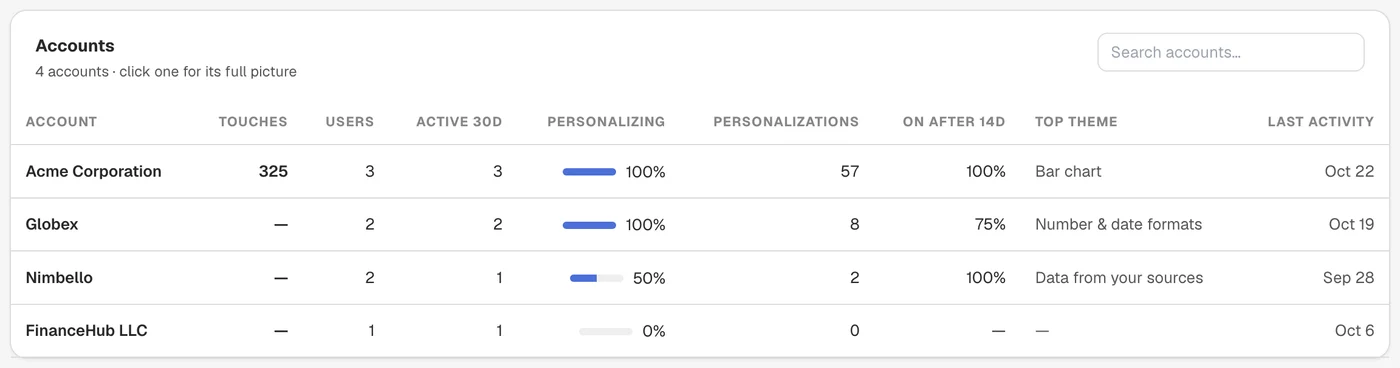
Fix it for the account. Skip the ticket.
After a QBR or an escalation, you don’t have to file a ticket and wait for a sprint. Describe the fix in plain language in the Usivity portal and send it to the account’s users yourself.
- 1
Describe the fix Pick the part of the product and write the change: “Rename Owner to Account manager,” “Hide the Forecast column.”
- 2
Send it to the account To the one person who raised it, or find the account’s users by company and send it to all of them.
- 3
It’s there for them Users apply it from their Usivity panel with one click. If their Usivity button is set to never show, it’s simply there on their next visit.
The portal shows each one asWaitingAppliedCouldn’t apply
The outcome
At-risk accounts become loyal ones.
A product that fits
Users stay because the product feels built for how they work.
No developer time
Requests get done the same day, without pulling in engineering.
Loyalty through ownership
When users shape their workspace, it becomes theirs.
Give customers the last 10% they need to stay. Without a line of code.
In ten minutes we’ll show you what your customers can change on their own, and which tickets you never have to open.
Book a 10-minute demo
We reply within one business day.
You’re booked.
We’ll reach out within one business day to confirm your 10-minute demo.